To write your very first blog post successfully, pick one specific problem your audience faces, outline a five-part structure (hook, problem breakdown, actionable solution, proof, and clear next steps), fill in key takeaways using short paragraphs, and configure basic on-page SEO before hitting publish.
If you recently launched your site using our complete step-by-step blog setup guide, your domain is live, your SSL certificate is green, and your WordPress dashboard is ready for action. Yet for almost every new site owner, opening the Gutenberg block editor for the first time triggers instant performance anxiety.
You wonder whether your writing is authoritative enough, what topic you should tackle first, or whether you should write an introductory diary post telling readers who you are. The truth is simple: your debut post sets the tone for your entire content library. When you approach it with a clear framework, writing becomes fast, enjoyable, and rewarding.
The Strategic Framework: Why Most Beginners Get Stuck
The single biggest mistake new bloggers make is writing a personal greeting post. In the early 2000s, writing “Welcome to my online journal” worked because people read blogs like digital diaries. Today, readers arrive through search engines and social feeds looking for quick solutions to specific challenges.
If a visitor lands on an introductory article with no actionable utility, they bounce back to the search results within five seconds. Your first article must solve a concrete dilemma. When you help someone accomplish a specific task, you earn their trust, an email subscriber, and positive behavioral signals for search engines.
- Publishing a generic “Welcome to my blog” personal diary post.
- Waiting weeks to perfect grammar instead of publishing real value.
- Writing 3,000 rambling words without headings or search intent.
- Installing heavy page builders that destroy mobile loading speed.
- Solving one precise question tied to your core niche topic.
- Using a structured 5-part plug-and-play drafting template.
- Structuring scannable content with clean H2 and H3 subheadings.
- Optimizing on-page SEO from day one with Rank Math and clean themes.
By shifting your focus from self-expression to reader assistance, writer block vanishes. You are not trying to summarize your whole philosophy in one go. You are simply showing someone how to take their next step.
Step-by-Step Implementation Blueprint: From Blank Page to Live Post
Publishing your first piece of content does not require technical mastery. When you follow this streamlined 3-step operational workflow, you eliminate guesswork and build momentum immediately.
Step 1: Identify One Burning Question
Before typing a word, confirm that people actually care about your topic. If you explored our profitable blog niche blueprint, you know that targeting narrow, low-competition queries creates early ranking opportunities.
Ask yourself: what is the most fundamental question a novice in your space asks on Reddit, Quora, or Google? For example, instead of writing “Everything About Specialty Coffee,” write “How to Grind Coffee Beans at Home Without a Burr Grinder.” Specificity beats broad summaries every time.
Step 2: Outline Your Content Architecture
Open WordPress and click Posts → Add New. Set up your heading hierarchy immediately before drafting paragraphs. Use one H1 tag (which WordPress creates automatically from your post title), followed by logical H2 tags for main sections and H3 tags for specific sub-steps.
This structure helps two groups: mobile readers who skim on smartphones and search engine crawlers that index your content hierarchy.
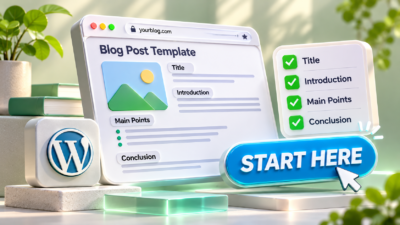
Step 3: The Plug-and-Play Fill-in Blog Post Template
Copy this modular template directly into your drafting notes. Replace the bracketed prompts with your niche expertise:
“Are you struggling with [Common Pain Point]? You are not alone. Most beginners believe that solving [Problem] requires [Expensive Tool / Complex Skill], but you can actually fix it in [Timeframe or Simple Method]. In this quick guide, you will learn the exact steps to achieve [Desired Result] without [Frustrating Roadblock].”
Part 2: Why Common Advice Fails (150 Words)
“Most generic advice tells you to [Mention Ineffective Method]. The problem with this approach is [Explain Flaw or Cost]. When you do that, you end up with [Unwanted Outcome]. Instead, a modern approach focuses on [Core Principle You Recommend].”
Part 3: The Step-by-Step Action Plan (500 to 800 Words)
– Step 1: [Actionable Setup Task]. Explain what tool to open and the exact button to click.
– Step 2: [Core Execution Task]. Share a practical tip or visual screenshot demonstrating how it works.
– Step 3: [Verification / Final Polish]. Tell the reader how to confirm everything is working properly.
Part 4: Pro Tips & Common Pitfalls (150 Words)
“While executing this process, watch out for these two beginner traps: 1. [Trap A] – avoid it by doing [Fix]. 2. [Trap B] – fix it by adjusting [Setting].”
Part 5: Summary & Next Action (100 Words)
“Solving [Problem] does not have to be difficult. By focusing on [Step 1] and [Step 2], you get predictable results right away. Which part of this guide did you find most useful? Drop a comment below or read our companion guide on [Related Topic].”
Step 4: Execute On-Page SEO and Formatting
Once your draft is written, optimize your presentation. Install the Rank Math SEO plugin to configure your focus keyword, meta title, and meta description. Keep paragraphs under three sentences to make reading effortless on mobile devices.
Add two internal links to relevant resources to help Google crawl your website architecture. As you publish more articles, follow our roadmap on practical blog SEO to reach your first 1,000 visitors to steadily build search traffic.
First Blog Post Pre-Flight Checklist
Before you click the blue publish button, verify these core technical and editorial elements:
| Element | Beginner Pitfall | Professional Standard |
|---|---|---|
| Permalink / URL | site.com/?p=123 or date-based URLs | Short, keyword-rich slug (e.g., /grind-coffee-beans/) |
| Featured Image | Uncompressed 5MB PNG photo | WebP format under 100 KB with descriptive alt text |
| Search Intent | Personal updates with no user benefit | Clear answer addressing a known search query |
| Call to Action | Article ends abruptly with no next step | Invitation to comment, sign up, or read related post |
Recommended Tool Stack for Frictionless Writing
Writing regularly is much easier when your website backend runs smoothly. Slow admin panels and confusing themes create friction that stops writers in their tracks.
For your hosting foundation, managed WordPress hosting on Hostinger delivers rapid NVMe storage, meaning your WordPress editor saves drafts instantly without lagging. Pair it with a domain registered cleanly through Namecheap to keep domain privacy included at zero extra cost.
On the design front, avoid bloated multi-purpose themes. Install lightweight themes like GeneratePress or Astra, which load in under half a second out of the box. For SEO guidance, activate the free version of Rank Math for instant on-page checklists, and add WP Rocket once your site begins receiving traffic to automate caching and Core Web Vitals optimization.
Frequently Asked Questions
How long should my very first blog post be?
Aim for 1,000 to 1,400 words. You do not need an exhaustive 4,000-word essay. Focus on completely answering the user’s specific problem without fluff or filler content.
Should my first post introduce myself or solve a problem?
Always solve a problem. Save your personal journey and credentials for your About page. Visitors searching on Google want an immediate solution to their query, not your autobiography.
How many images should I include in my debut article?
Include two to four relevant visuals, such as screenshots or diagrams. Make sure to compress each image to WebP format under 100 KB and write clear alt text explaining what the image shows.
Can I edit or update my first blog post after publishing?
Yes. Blog posts are living assets. You can refine your content, update outdated steps, and add internal links as your library grows without breaking your existing URL structure.