To write your very first blog post successfully, target one specific reader question, outline three main subheadings, and follow a plug-and-play structure: hook the reader, deliver actionable step-by-step solutions, and finish with a single call to action. Avoid overthinking perfection by publishing quickly to start indexing.
Staring at an empty white screen inside WordPress can freeze any new creator in their tracks. You have your domain ready, your theme installed, and your passion running high, yet the blinking cursor feels like a brick wall. If you followed our start a blog blueprint, you already have your technical infrastructure dialed in. Now comes the defining moment: getting your thoughts organized, written, and published.
The Strategic Framework: Why Most Beginners Get Stuck
Most novice writers fail on post number one because they treat their opening article like a personal autobiography. They write a rambling introduction explaining why they launched the site, what their daily routine looks like, and what they hope to accomplish over the next five years. Search engines ignore these posts, and busy readers click away within three seconds.
Modern publishing works in reverse. Your audience arrives through search queries or social shares looking for an immediate answer to a headache they have right now. Your first post must prove competence by delivering a fast, practical win. Sidestep the classic missteps detailed in our breakdown of 10 common blogging mistakes beginners make and adopt a lean content creation mindset instead.
- Writing a 3,000-word personal welcome journal that nobody searches for.
- Spending three weeks obsessing over font pairings before publishing word one.
- Relying on zero keyword intent or practical problem-solving structure.
- Publishing a wall of text without clear headings, bullets, or visual breaks.
- Answering one hyper-specific question with immediate practical clarity.
- Using a modular fill-in template that cuts writing time to under two hours.
- Targeting zero-competition long-tail search phrases from day one.
- Formatting with native Gutenberg blocks for clean mobile readability.
Step-by-Step Implementation Blueprint
Executing your maiden article requires a disciplined three-stage process. You need to validate the idea, build the copy inside a battle-tested structure, and configure your WordPress environment for clean loading speeds and search discovery.
Phase 1: Selecting Your Topic and Angle
Never write blindly. Go to Google and type your primary topic followed by words like ‘how to’, ‘best way’, or ‘for beginners’. Look at the auto-suggest results. Pick a topic narrow enough that you can thoroughly cover it in 1,200 words. If you run a gardening blog, do not write about ‘How to Garden’. Instead, write ‘How to Prune Tomato Plants for Maximum Fruit Yield in Small Pots’. Specificity builds authority fast.
Phase 2: The Fill-in-the-Blank Post Template
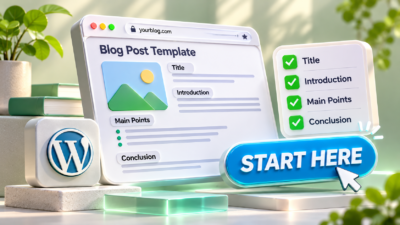
Copy this skeleton directly into your text editor or WordPress post draft. It provides the exact layout needed to keep visitors engaged and scrolling:
Title: How to [Achieve Specific Result] Without [Main Pain Point] (Step-by-Step) [Year]

[Intro Paragraph 1: State the exact problem your reader is facing]
If you are trying to [achieve result], you have probably run into [common roadblock]. It is frustrating to spend hours on [topic] only to end up with [poor outcome].

[Intro Paragraph 2: Validate their frustration and present your solution]
Here is the good news: getting this right does not require [expensive tool or endless hours]. With the right setup, you can [desired outcome] quickly.

[Answer Box: Provide the summary answer in 40-50 words]
To [solve problem], first [Step 1], then [Step 2], and finally [Step 3]. By focusing on [key technique], you eliminate [main frustration] and achieve [result].

[H2: Why Most Beginners Struggle With (Problem)]
- Mistake 1: [Brief explanation of bad approach]
- Mistake 2: [Brief explanation of second pitfall]

[H2: Step 1: (First Actionable Step)]
[Explain the step, provide an image or code snippet, and explain the exact configuration]

[H2: Step 2: (Second Actionable Step)]
[Walk through the execution. Explain recommended settings and practical tips]

[H2: Step 3: (Third Actionable Step)]
[Detail the final execution step. Highlight common errors to avoid]

[H2: Recommended Setup and Recommended Tools]
[Mention 2-3 trusted tools that make the process faster]

[H2: Final Verdict / Next Steps]
[Summarize the primary action item. Ask a concluding question to encourage comments]
Phase 3: Formatting in WordPress Block Editor
When you transfer your draft into the WordPress Gutenberg editor, formatting determines whether readers stay or bounce. Keep paragraphs short, generally two to three sentences maximum. Utilize bulleted lists to break up dense explanations. Insert descriptive subheadings (H2s and H3s) so scanners can navigate effortlessly. For an in-depth breakdown on driving early traffic to these pages, review our guide to beginner SEO to get your first 1,000 blog readers.
The Pre-Publish Quality and Technical Checklist
Before you hit the blue Publish button in WordPress, run your post through this operational checklist. Skipping these small steps often leads to broken images, slow load times, or crawling errors.
| Element | Recommended Target | Primary Impact |
|---|---|---|
| Permalink / URL Slug | 3 to 5 words matching focus keyword | Clean search indexing |
| Image File Sizes | Under 150 KB (WebP format) | Core Web Vitals and page speed |
| Meta Description | 140 to 155 characters with call to action | Click-through rates from search results |
| Image Alt Text | Descriptive summary of the visual | Accessibility and image search rankings |
Recommended Infrastructure and Tools for High Performance
Great content needs solid technical support. If your website takes four seconds to load, visitors will leave before reading your first sentence. Here is the exact stack we rely on across our client sites and publishing networks:
- Reliable Hosting: A rock-solid host like Hostinger delivers NVMe storage and LiteSpeed caching at budget-friendly starter pricing. Pair your domain from Namecheap for straightforward DNS routing without unexpected renewal price spikes.
- Lightweight Theme: Use GeneratePress or Astra. These themes add less than 50 KB of code to your DOM, ensuring your site stays blazing fast out of the box.
- On-Page SEO Plugin: Install Rank Math. It handles XML sitemaps, schema markup, and meta descriptions without bloating your database.
- Caching and Asset Optimization: WP Rocket automatically handles CSS minification, JavaScript deferral, and lazy loading for smooth Core Web Vitals scores.
Frequently Asked Questions
How long should my very first blog post be?
Aim for 1,000 to 1,500 words. This provides enough depth to thoroughly answer your chosen question and satisfy search intent without diluting your message or burning yourself out on week one.
Should I publish an intro or about me post first?
No. Save your background story for your dedicated About Page. Your first blog post should directly solve a specific problem for your target reader to build authority and earn search traffic immediately.
How many images should I include in my opening post?
Include two to four relevant visuals, such as screenshots or annotated diagrams. Compress every image to WebP format under 150 KB and always write descriptive alternative text for accessibility.
Do I need an affiliate link in my first post?
Only include an affiliate link if it genuinely connects to a tool or product you actively use that solves the reader’s problem. Never force monetization into your first article at the expense of trust.